
Paying employees accurately and on time is one of an employer’s most important jobs, and one of the easiest to get wrong. Each pay run involves hours, rates, overtime, tax withholdings, social security, benefits, employer contributions and a bank transfer that must match to the cent. A payroll statement template gives you a consistent record of every run, so you can check the numbers before money moves and prove them afterwards to managers, auditors and tax authorities.
This guide is about employer payroll statements: the registers, summaries and reconciliations that cover the whole workforce. For the pay statement an individual employee receives, see our salary statement templates. Below you’ll learn what payroll statements include and how to prepare them each pay period, and you can download five free templates.
What Is a Payroll Statement?
A payroll statement is an employer’s summary of wages paid and deductions made for a pay period, a month or a year. It can take several forms:
- Payroll register: a line for every employee in a pay run, showing hours, gross pay, each deduction and net pay, with totals at the bottom.
- Payroll summary: totals grouped by department, location or cost centre, often used for management accounts and budgets.
- Employer payroll cost statement: gross pay plus employer contributions such as social security, Medicare or National Insurance, unemployment insurance, pensions and benefits, showing the true cost of employment.
- Year-to-date payroll statement: month-by-month totals with running year-to-date figures, used to prepare annual employer returns.
- Payroll reconciliation statement: proof that the register agrees with the bank payments and the general ledger.
Key Elements of a Payroll Statement
- Employer name, pay period dates and pay date
- Employee name or ID, role and department
- Regular hours, overtime hours and rates, or salary amounts
- Gross pay, including bonuses, commissions and allowances
- Employee withholdings, such as income tax, social security and Medicare (or local equivalents), pension contributions and other deductions
- Net pay for each employee and in total
- Employer contributions and taxes
- Totals and approval signatures
Gross Pay to Net Pay: How the Calculation Works
For hourly employees, gross pay is regular hours × rate plus overtime hours × rate × the overtime multiplier, which is often 1.5. Salaried employees receive their period salary. Commissions and bonuses are added on top.
Then come the deductions. Income tax withholding depends on each employee’s tax code or withholding certificate. Social insurance contributions are usually a flat percentage of gross pay up to annual limits. In the US, the employee share is 6.2% for social security and 1.45% for Medicare, but rates differ by country, so treat the sample rates in the templates as placeholders. Voluntary deductions such as pension contributions, union dues and loan repayments come off last.
Net pay = gross pay − taxes withheld − other deductions.
Employers then pay their own share of payroll taxes and benefits on top of gross pay. That is why total payroll cost is always higher than the wages bill shown on payslips.
Download 5 Free Payroll Statement Templates
These templates cover the employer’s side of payroll: the register for each pay run, cost reports for management, year-to-date totals and the reconciliation that proves everything agrees. The Excel files calculate gross pay, withholdings, employer taxes and totals automatically.
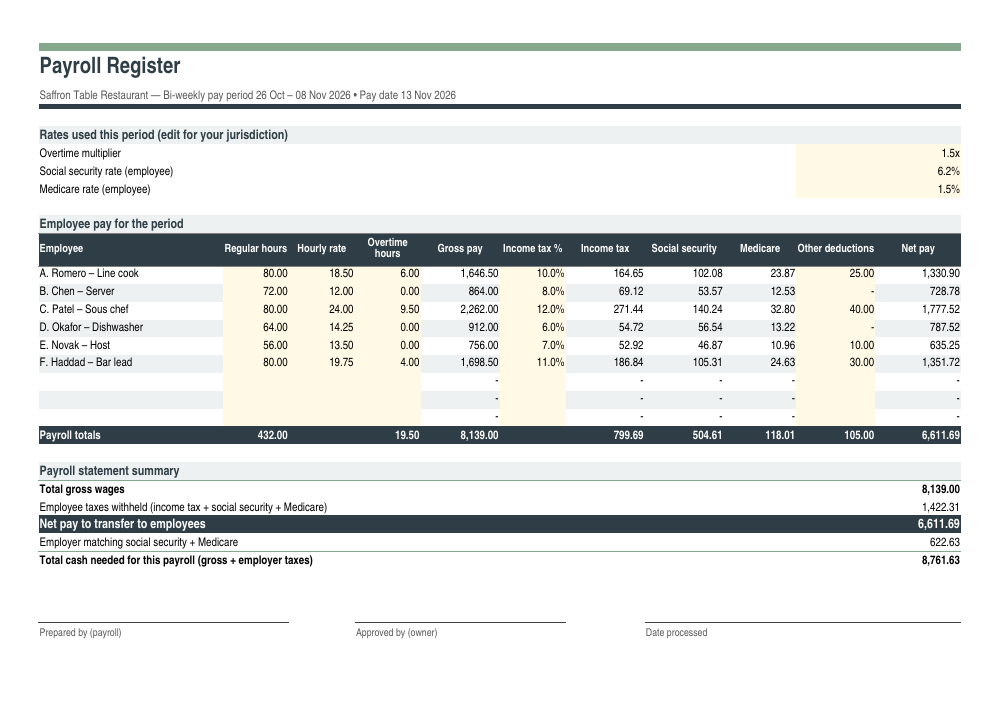
1. Payroll Register Template
An employer’s payroll register for each pay period: hours, overtime, gross pay, withholdings and net pay for every employee. It also shows the total cash the payroll needs, including employer taxes.
2. Departmental Payroll Summary Statement
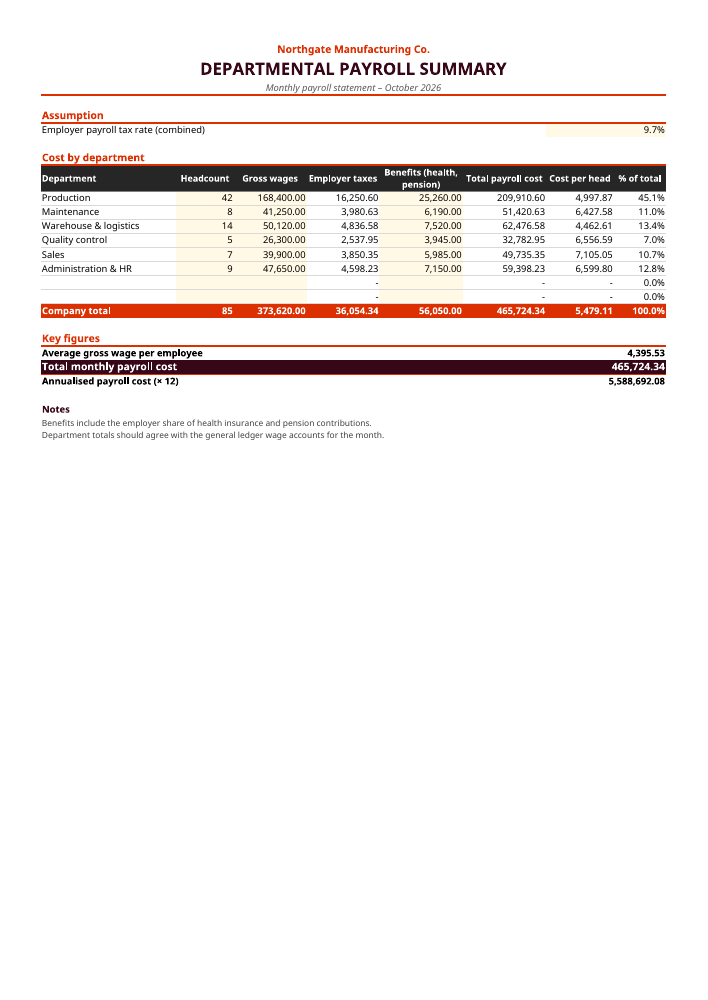
Monthly payroll cost by department, with headcount, employer taxes, benefits, cost per head and each department’s share of total payroll.
3. Employer Payroll Cost Statement
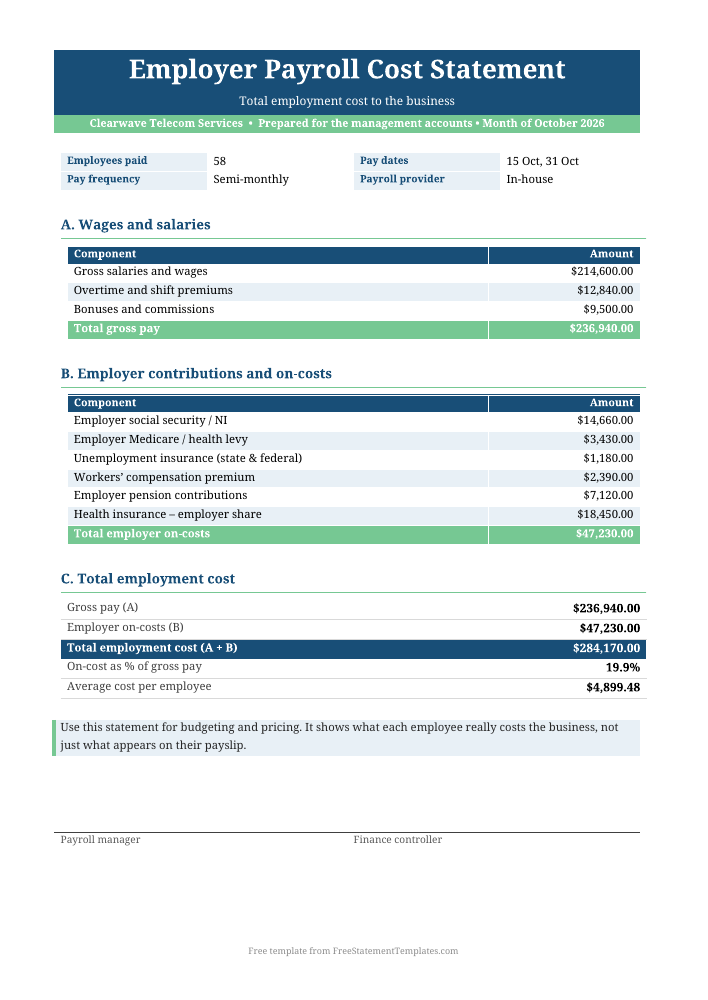
A management-accounts statement that adds employer contributions and on-costs to gross pay to show the true cost of employment.
4. Annual Payroll Statement (Year-to-Date)
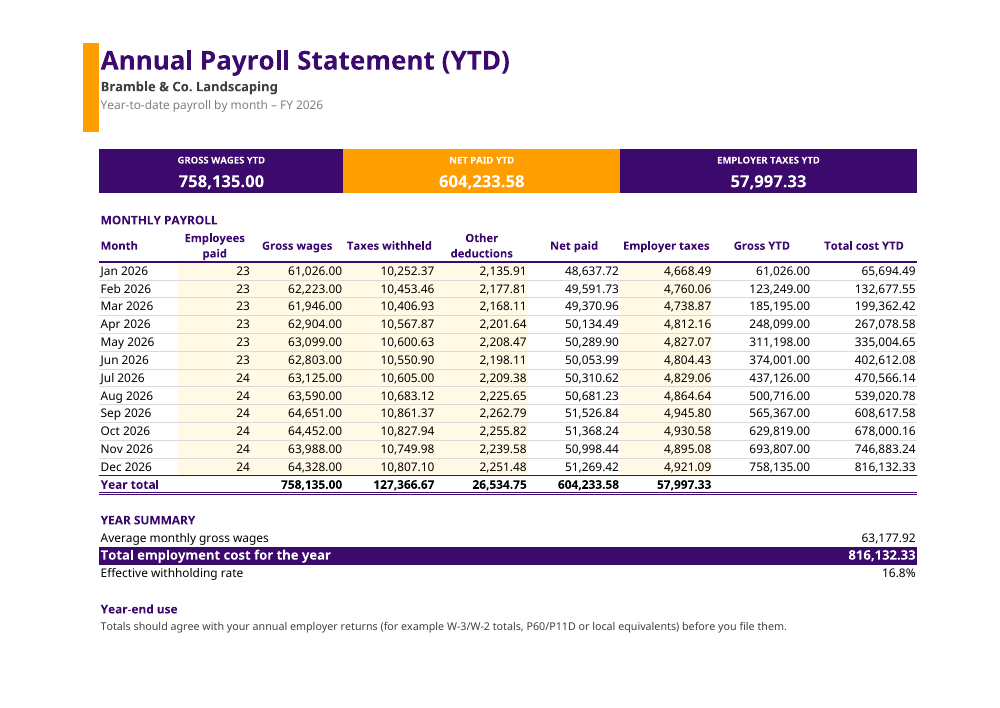
Twelve months of payroll with running gross and total-cost year-to-date columns. It makes year-end returns easy to check.
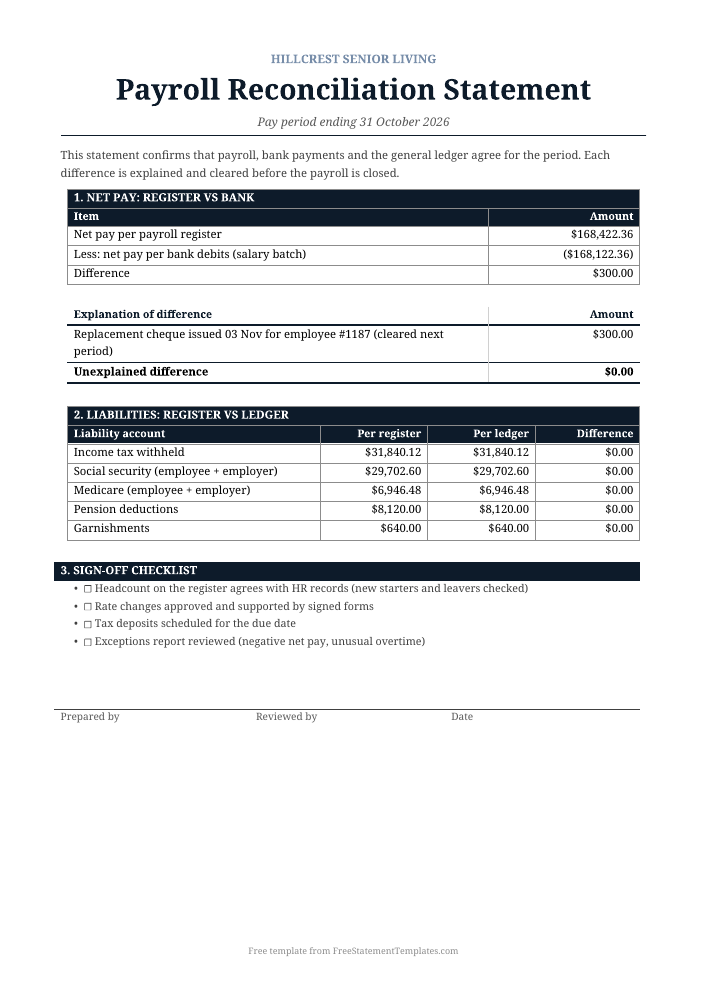
5. Payroll Reconciliation Statement
Reconciles the payroll register to the bank and the general ledger, explains each difference and ends with a sign-off checklist.
How to Prepare a Payroll Statement Each Pay Period
- Collect time and pay data. Gather timesheets, overtime approvals, new starters and leavers, rate changes, bonuses and absences for the period.
- Update rates and assumptions. Check that the tax rates, contribution rates and limits in the template are current for your jurisdiction.
- Enter each employee in the payroll register with hours, rates and any other deductions. The template calculates gross pay, withholdings and net pay.
- Review exceptions before approving. Look for negative or unusually high net pay, overtime far above normal, missing employees or duplicate lines.
- Approve and pay. The register summary shows the net pay to transfer and the employer taxes you’ll need to deposit, which together give the total cash needed.
- Record the journal. Post gross wages and employer taxes as expenses, and post withholdings and net pay as liabilities until they are paid.
- Reconcile. Use the reconciliation statement to agree net pay to the bank and each liability to the ledger.
Using the Departmental Summary and Cost Statement
Managers rarely need individual pay details. They need to know what each team costs. The departmental summary takes headcount, gross wages and benefits for each department, applies your combined employer tax rate and gives the total payroll cost, cost per head and each department’s share of the total. Pair it with your profit and loss statement to track labour cost as a percentage of revenue.
The employer payroll cost statement goes a step further for budgeting and pricing. It lists each on-cost, including employer social security, unemployment insurance, workers’ compensation, pensions and health insurance, and shows on-costs as a percentage of gross pay and the average cost per employee. That number is essential when you quote for contracts or plan new hires.
Year-End and the YTD Payroll Statement
At year-end, employers file annual returns that summarise wages and withholdings, such as W-2s and the W-3 in the US, final submissions in the UK or the equivalent elsewhere. The annual YTD template records each month’s gross wages, withholdings, deductions, net pay and employer taxes, with running year-to-date columns. Its totals should agree with your annual filings, and any difference should be explained before you submit.
Payroll Reconciliation: Why It Matters
Reconciliation is how payroll errors get caught before they become expensive. The reconciliation statement walks through three checks:
- Net pay vs bank: the total net pay on the register should match the salary batch debited from the bank. Common differences include replacement cheques, rejected bank details and manual payments.
- Liabilities vs ledger: tax withheld, social security, pension and garnishment balances should agree between the register and the general ledger, and should clear to zero once paid.
- Headcount and changes: new starters, leavers and rate changes should all be backed by approved HR documents.
Any unexplained difference should be investigated before the period is closed. Our bank reconciliation statement templates use the same approach for bank accounts.
How Long to Keep Payroll Records
Payroll records are among the documents tax and labour authorities ask for most often, and the required retention periods are long. In the US, employment tax records must generally be kept for at least four years. In the UK, payroll records must be kept for three years from the end of the tax year they relate to, and many other countries require five to ten years. Keep each signed payroll register, the approved reconciliation, timesheets, rate-change approvals and evidence of tax deposits together for each period. Store copies securely, because payroll files contain sensitive personal data such as bank details and identification numbers. Limit access to the people who need it and follow your local data-protection rules when you share or dispose of old records.
Common Payroll Mistakes
- Out-of-date tax or contribution rates in spreadsheets copied from a previous year
- Overtime calculated on the wrong base, for example ignoring shift premiums that should be included
- Misclassifying workers as contractors when they should be on payroll
- Missing deposit deadlines for withheld taxes, which can bring penalties even when the amounts are right
- No approval trail. Every pay run should be reviewed and signed by someone other than the preparer.
Find more related records in our Salary & Expense Statements category, including expense statement templates.
Frequently Asked Questions
What is the difference between a payroll statement and a pay stub?
A pay stub, or salary statement, is given to one employee and shows their own earnings and deductions. A payroll statement is the employer’s record for the whole workforce, or a group of employees, for a pay run, month or year, including employer contributions that don’t appear on pay stubs.
What is a payroll register used for?
A payroll register lists every employee paid in a pay run with hours, gross pay, deductions and net pay, plus totals. It is used to approve the payroll, fund the bank transfer, record the accounting journal and answer questions from auditors or tax authorities later.
Are the tax rates in these templates correct for my country?
The templates use sample rates, such as US social security at 6.2% and Medicare at 1.45%, so that the formulas work out of the box. Payroll taxes vary by country, state and year, so replace the rates in the yellow input cells with the ones that apply to you, or confirm them with your payroll provider or accountant.
How do I calculate the total cost of payroll to the employer?
Add gross wages to all employer-paid costs: the employer share of social security or National Insurance, unemployment insurance, workers’ compensation, pension contributions and benefits such as health insurance. The employer payroll cost statement template shows this calculation and the on-cost percentage.
How often should payroll be reconciled?
Reconcile every pay run. At minimum, agree net pay to the bank and check the payroll liability accounts each month. A full year-to-date reconciliation before filing annual returns is also strongly recommended.
Can small businesses use spreadsheets for payroll?
Many small employers start with spreadsheets like these, especially with only a few employees. As headcount grows, or if your tax rules are complex, payroll software or a payroll provider reduces risk. These templates are still useful for review, budgeting and reconciliation alongside your software.
Final Thoughts
Good payroll records protect your employees, your cash flow and your compliance. Use the register for each run, the summaries for management, the YTD statement for year-end and the reconciliation to prove it all agrees. Have someone review it every time and keep the signed records.