
A balance sheet is a snapshot of what a business owns, what it owes and what is left over for its owners on one specific date. Lenders ask for it, investors read it first and accountants build the rest of the annual accounts around it. A good balance sheet template saves you from starting with a blank page. It also puts every line in a logical order, keeps the totals accurate and proves the statement balances before anyone else sees it.
This guide explains how a balance sheet works and what belongs in each section. It then shows how to fill one in step by step and which layout suits which situation. You can download five free templates in Excel, Word and PDF, including classified, comparative and monthly versions, and adapt them to your own business.
What Is a Balance Sheet?
A balance sheet, also called a statement of financial position, lists a business’s assets, liabilities and equity at a single point in time, usually the last day of a month, quarter or financial year. It rests on the accounting equation:
Assets = Liabilities + Equity
The equation always holds because every asset a business controls was paid for in one of two ways: by borrowing (liabilities) or with the owners’ money and retained profits (equity). If your totals don’t agree, something is missing, duplicated or misclassified. That is why every Excel template on this page has an automatic balance check.
The balance sheet is one of the three core financial statements. The income statement shows performance over a period, and the cash flow statement shows how cash moved. The balance sheet shows the position at the end of that period. Read together, the three explain how a business is doing and how it got there.
Key Components of a Balance Sheet
Assets
Assets are resources the business controls that are expected to bring future economic benefit. They are normally split into two groups:
- Current assets: items you expect to turn into cash or use up within twelve months, such as cash and bank balances, accounts receivable, inventory and prepaid expenses.
- Non-current assets: long-term resources such as property, plant and equipment (shown net of depreciation), intangible assets like software or trademarks, and long-term investments.
Liabilities
Liabilities are obligations the business must settle in the future. They are also split by timing:
- Current liabilities: amounts due within twelve months, including accounts payable, accrued expenses, short-term loans, taxes payable and the current portion of long-term debt.
- Non-current liabilities: obligations due after twelve months, such as long-term bank loans, lease liabilities, deferred tax and long-term provisions.
Equity
Equity is the owners’ residual interest: total assets minus total liabilities. In a company it usually includes share capital, share premium, retained earnings and other reserves. For a sole trader it is owner’s capital plus profit minus drawings, and for a partnership each partner has a capital account. If you need more detail on how equity changes over a year, see our guide to the statement of retained earnings.
Balance Sheet Formats: Which One Do You Need?
There are several common layouts. The numbers are the same in each, but the presentation suits different readers.
- Classified balance sheet: separates current and non-current items so readers can judge liquidity quickly. This is the format most lenders expect.
- Comparative balance sheet: shows two or more dates side by side with the change in value and percentage, which makes trends obvious.
- Report form: a vertical layout with assets first, then liabilities and equity underneath. Annual reports use it, and it usually carries note references.
- Account form: assets on the left and liabilities plus equity on the right, mirroring the accounting equation. It is common in textbooks and some European filings.
- Monthly or rolling balance sheet: month-end balances in columns across the year. Owners use it to track cash, stock and debt between year-ends.
Download 5 Free Balance Sheet Templates
Each template below has a different layout for a different reporting job. The Excel files contain working formulas for totals, ratios and the balance check. The Word files are easy to edit by hand, and every template also comes as a print-ready PDF.
1. Classified Balance Sheet Template
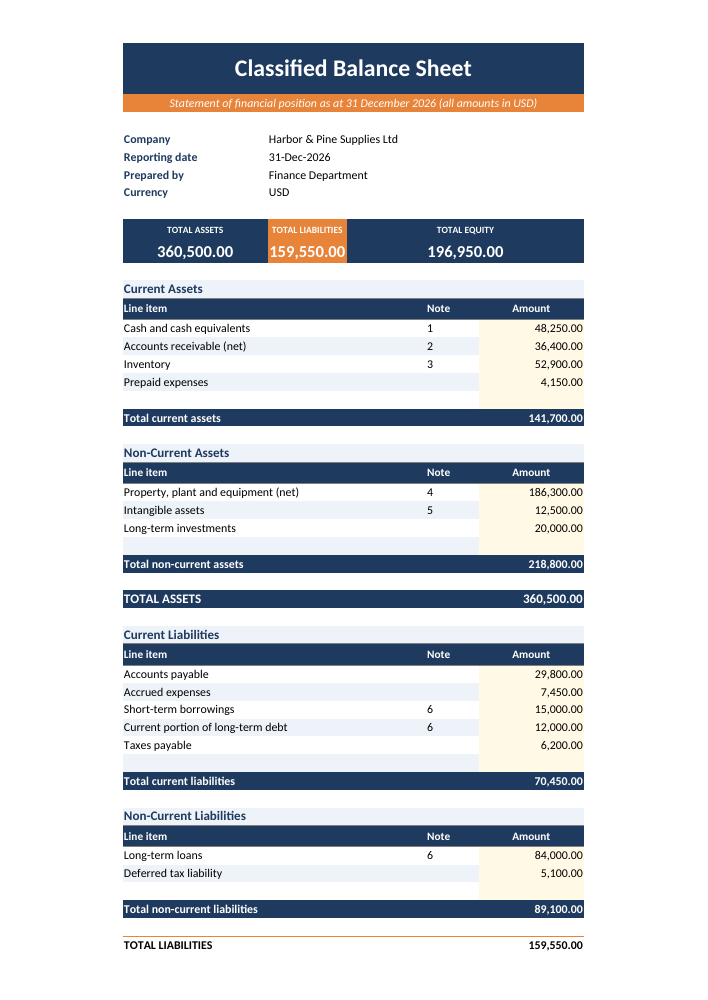
A full classified layout that separates current and non-current items, with summary cards, an automatic balance check and current and debt-to-equity ratios. Good for companies that need a formal statement of financial position.
2. Comparative Balance Sheet Template (Two Years)
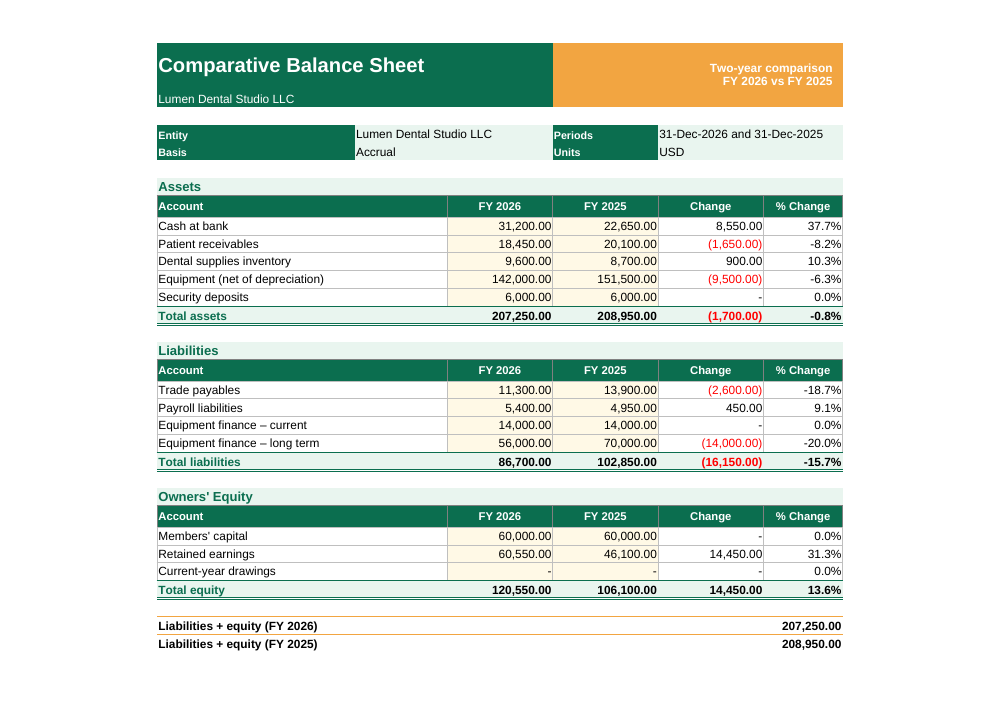
A landscape comparison of this year and last year. Change and % Change columns calculate automatically, and each year has its own balance check. Use it for lender packs, board reports or year-end reviews.
3. Monthly Balance Sheet Tracker
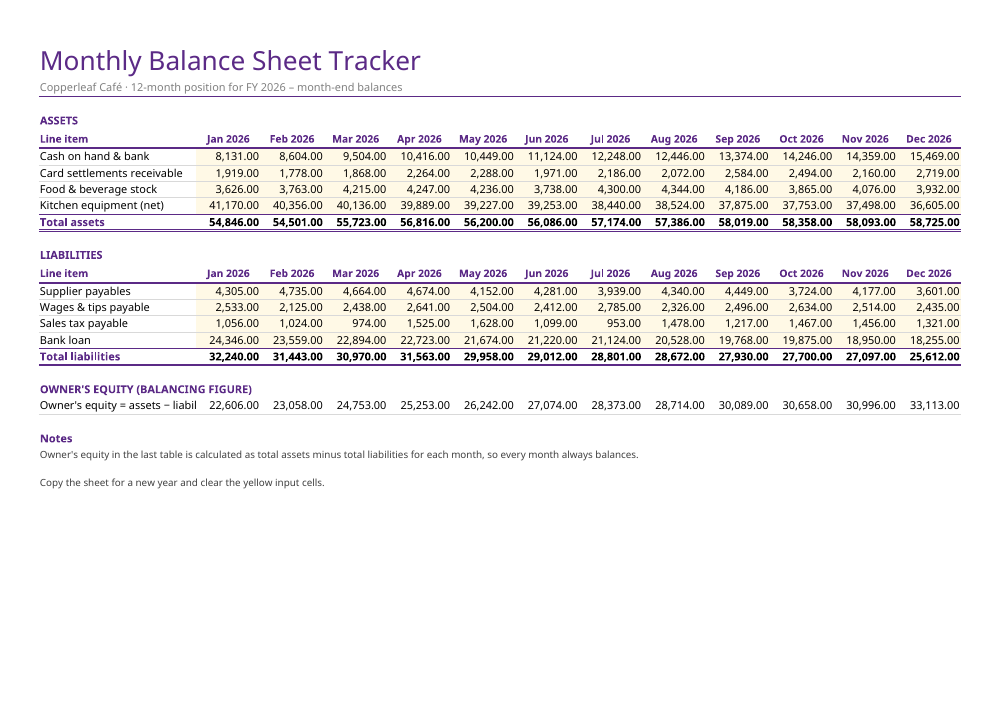
A 12-column workbook for month-end balances. Equity is calculated as assets minus liabilities each month, so you can watch cash, stock and debt move across the year.
4. Small Business Balance Sheet Template
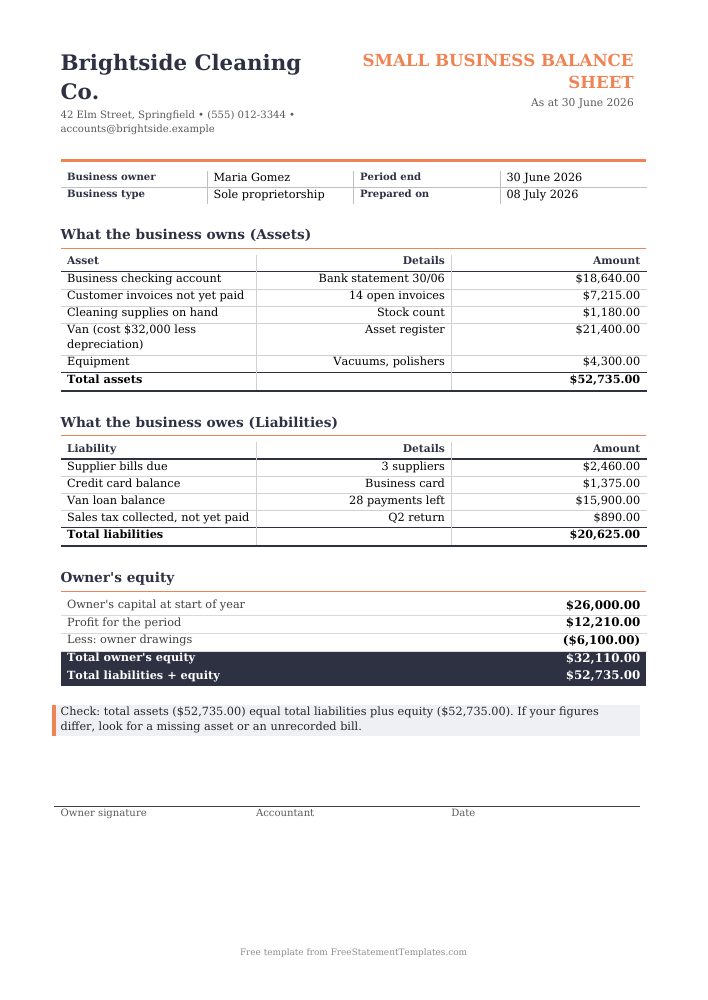
A plain-language Word balance sheet on a letterhead layout. Sections read “what the business owns” and “what it owes”, which suits sole traders, freelancers and loan applications.
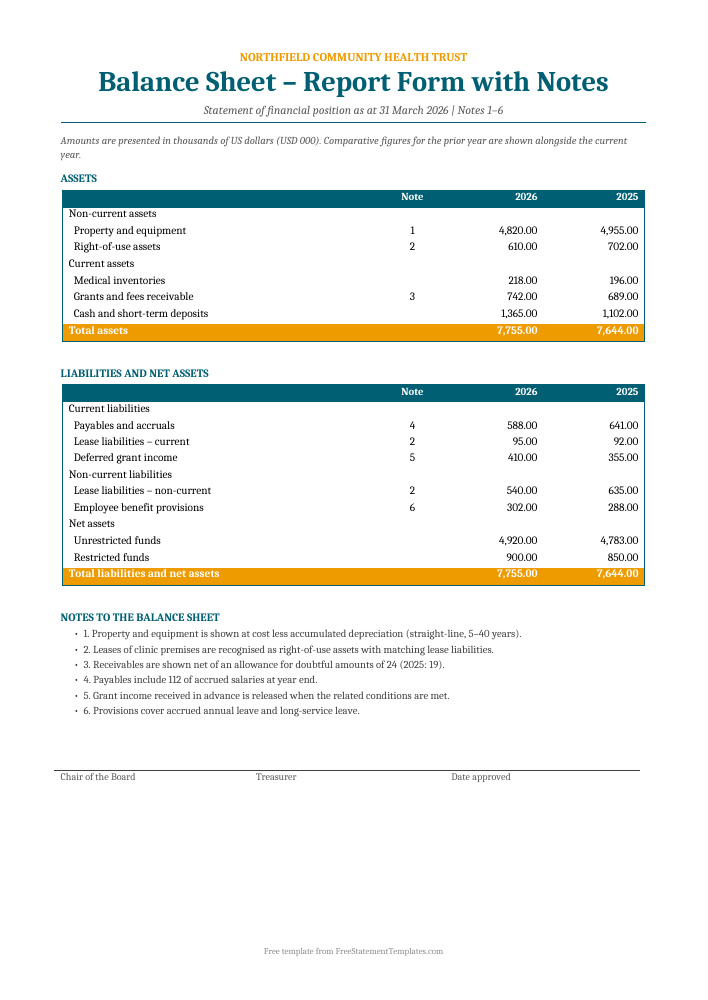
5. Report-Form Balance Sheet with Notes
A vertical report-form statement with note references, comparative columns and a notes section. It suits nonprofits, trusts and companies preparing annual accounts.
How to Prepare a Balance Sheet Step by Step
Whichever template you choose, the process is the same. Work from reliable source documents rather than memory.
- Choose the reporting date. A balance sheet is always “as at” a date, for example 31 December 2026. Every figure must reflect that day.
- Close the books for the period. Post all invoices, bills, payroll and bank transactions up to the reporting date, and run a trial balance from your accounting software.
- Reconcile cash. Agree each bank account to its statement. Our bank reconciliation statement templates can help if there are timing differences.
- List current assets. Enter cash, then receivables (less any allowance for bad debts), inventory at the lower of cost and net realisable value, and prepayments.
- List non-current assets. Use the fixed asset register for cost less accumulated depreciation, then add intangibles and long-term investments.
- List liabilities. Include supplier balances, accrued expenses such as wages and utilities, tax owed, and loan balances from lender statements. Split each loan into the part due within a year and the rest.
- Calculate equity. Bring forward opening equity, add profit for the period from the income statement and deduct dividends or drawings.
- Check that it balances. Total assets must equal total liabilities plus equity. If the check fails, look first at items posted to the wrong side or missing year-end adjustments.
- Review and sign. Compare the figures with last year, explain any large movements and have the statement reviewed before you share it.
How to Fill In the Templates
The Excel templates use pale yellow cells for inputs, and everything else calculates. In the classified template, type each balance next to its line item. Section totals, total assets, total liabilities, equity, the current ratio and the debt-to-equity ratio update instantly. The summary cards at the top show the three headline totals, and the “Balance check” cell at the bottom reads “Balanced” when the equation holds.
In the comparative template, enter the current year and the prior year in separate columns. The change and percentage change columns work themselves out, so you can spot unusual movements at once. The monthly tracker treats equity as the balancing figure each month, which suits small businesses that track cash and stock but don’t close formal books every month.
The Word templates are deliberately simple. Replace the sample text with your own business name, dates and amounts, then recheck the totals with a calculator or copy the figures from your accounting software. Keep the “Notes” section in the report-form template, because notes explain the accounting policies behind the numbers.
Reading a Balance Sheet: Useful Ratios
Once the statement balances, a few ratios turn the numbers into insight:
- Current ratio (current assets ÷ current liabilities) measures short-term liquidity. A result above 1.0 means the business has more short-term resources than short-term obligations.
- Quick ratio ((current assets − inventory) ÷ current liabilities) is a stricter test that leaves out stock, which may be slow to sell.
- Debt-to-equity ratio (total liabilities ÷ total equity) shows how much the business relies on borrowed money.
- Working capital (current assets − current liabilities) is the cushion available to run day-to-day operations.
The classified template already calculates the current ratio and debt-to-equity ratio. Add the quick ratio in a spare row if your lender asks for it.
Common Balance Sheet Mistakes to Avoid
- Mixing up dates. Leaving a December invoice out of a 31 December balance sheet understates both receivables and revenue.
- Not splitting loans. The part of a loan due within twelve months is a current liability. Putting it all in non-current makes liquidity look better than it really is.
- Leaving out accruals. Unpaid wages, interest and utilities still belong on the balance sheet even if no bill has arrived.
- Showing assets at the wrong value. Equipment should be shown net of depreciation, and receivables net of amounts unlikely to be collected.
- Treating owner withdrawals as expenses. Drawings reduce equity. They do not belong in the income statement.
- Forcing the balance. Never add a “suspense” line just to make the totals agree. Find the actual error instead.
Who Uses a Balance Sheet Template?
Small business owners use one to apply for loans, overdrafts or leases. Startups include one in investor updates. Nonprofits prepare a statement of financial position for their boards and funders. Bookkeepers and accountants use a standard template to give every client a consistent format. Individuals use a similar layout to work out their net worth, and our personal financial statement templates are designed for that. For a full set of company accounts, pair this page with our financial statement templates and browse the Financial Statements category for related formats.
Frequently Asked Questions
What is the difference between a balance sheet and an income statement?
A balance sheet shows the financial position at one moment: what you own, what you owe and the owners’ equity. An income statement covers a period, such as a month or a year, and shows revenue, expenses and profit. The profit for the period flows into equity on the balance sheet, and that is the link between the two statements.
Why doesn’t my balance sheet balance?
The usual causes are a transaction recorded on only one side, an opening balance that doesn’t match last year’s closing figure, profit for the year not yet added to equity, or an asset or liability in the wrong section. Start with the size of the difference. If it equals a single transaction, or double one, you have probably found the error.
How often should I prepare a balance sheet?
Every business needs one at its financial year-end. Many prepare one monthly or quarterly as well, to track cash, debt and working capital. Lenders often ask for one with a loan application or as part of their covenants. The monthly tracker template on this page is built for regular reporting.
Can I use these balance sheet templates for a sole proprietorship?
Yes. The small business Word template is written in plain language for sole traders. Owner’s equity is shown as opening capital plus profit minus drawings. The classified and comparative Excel templates work for sole traders too: rename the equity lines to “Owner’s capital” and “Drawings”.
Are these templates suitable for IFRS or GAAP reporting?
The layouts follow the structure used under both IFRS and US GAAP: current and non-current classification, comparative figures and note references. They are a good starting point for small entities. Reporting requirements depend on your jurisdiction and size, though, so have a qualified accountant review statutory accounts before you file them.
Do the Excel templates work in Google Sheets?
Yes. Upload the .xlsx file to Google Drive and open it with Google Sheets. The formulas (SUM, IF, IFERROR and simple arithmetic) work the same way in Google Sheets, LibreOffice Calc and Apple Numbers.
Final Checklist Before You Share Your Balance Sheet
Before you send the statement to a bank, investor or board, check that the reporting date is correct on every page and that cash agrees to the bank statements. Make sure loans are split into current and non-current portions, profit agrees to the income statement and the balance check reads “Balanced”. Keep the workbook with your supporting schedules, because next year’s comparative figures come straight from this year’s balance sheet.