
A sworn statement is a written account that a person confirms under an oath, affirmation or other formally required declaration. It can be used to record facts, events, personal knowledge or an incident, but the exact legal effect and required wording depend on the jurisdiction, court, agency, employer, insurer or other organization receiving the document.
The two free editable templates below are designed as practical starting points. The first provides a general structure for identifying the declarant, setting out numbered facts and adding the required declaration and signature areas. The second is organized specifically for incidents, with fields for date, time, location, people involved, chronology, supporting material and information received from others.
Download the Sworn Statement Templates
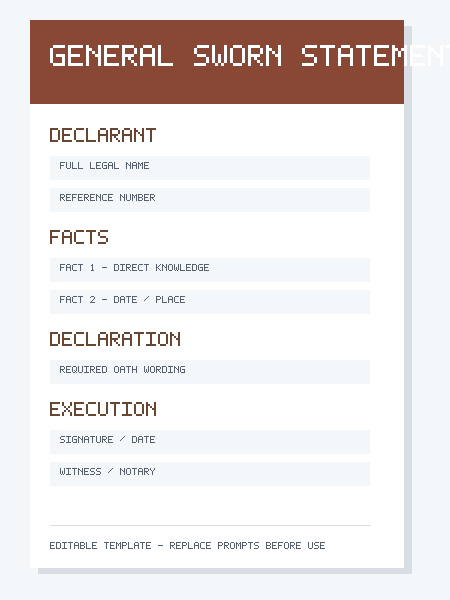
1. General Sworn Statement Template
Use this version when you need a clear, neutral format for facts personally known to the signer. It includes space for identification details, a numbered statement of facts, supporting records, the oath or declaration wording required for the matter, and signature, witness or notary information where applicable.
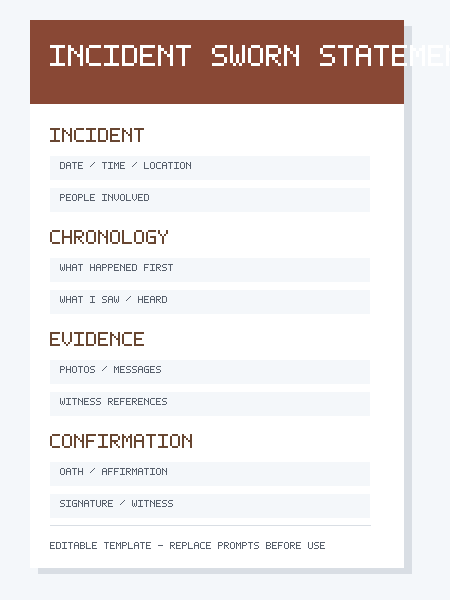
2. Incident Sworn Statement Template
This version is useful when the statement concerns a particular event. The layout encourages chronological writing and separates firsthand observations from evidence and second-hand information, making the final document easier to review.
What Is a Sworn Statement?
A sworn statement is generally a factual written statement that the signer formally confirms as true through an oath, affirmation or legally recognized declaration. The term can overlap with affidavit, statutory declaration, verified statement or declaration under penalty of perjury, but those documents are not automatically interchangeable. Their requirements can differ substantially.
For that reason, a generic template should be used only as an organizational starting point. If a court, government department, police agency, insurer, employer or other authority provides an official form, use that form. If the statement will affect a legal proceeding or important rights, check the applicable rules or obtain qualified legal guidance before signing.
Core Elements of a Clear Sworn Statement
- Identity of the declarant: the full legal name and any other identifying details required for the matter.
- Reference information: a case number, claim number, file number, subject or other identifier.
- Personal knowledge: a clear indication of which facts the signer personally knows.
- Numbered facts: separate factual points that are easy to reference.
- Dates and locations: specific details when they are known and relevant.
- Supporting records: documents, photographs, messages, receipts, logs or other evidence that the statement refers to.
- Required declaration: the oath, affirmation or declaration wording accepted for the intended use.
- Execution: signature, date and any witness, authorized official or notary section required by law or procedure.
How to Write the Facts
Write facts in the order that makes them easiest to verify. For an incident, chronological order is usually the clearest approach. Begin with enough context to explain where you were and why you were in a position to observe the event. Then describe what you personally saw, heard, received, did or recorded.
Use precise language where possible. Instead of saying that something happened “around that time,” provide the time shown on a message, receipt, security record or other source if you can verify it. Instead of describing a person as angry, describe observable behavior if that behavior is relevant. A sworn statement is generally stronger when it distinguishes observation from interpretation.
Separate Firsthand Knowledge From Information Received From Others
If someone else told you something, identify the source rather than presenting the information as though you personally witnessed it. For example, write that a named person told you a particular fact on a particular date, if that information is relevant and permitted. Do not silently convert second-hand information into firsthand knowledge.
The same principle applies to assumptions. If you do not know why a person acted in a particular way, avoid guessing at motive. If a date is uncertain, say that it is approximate rather than inventing precision. Accuracy matters more than making every part of the account sound definite.
Sworn Statement vs. Affidavit
An affidavit is commonly a written statement made under oath or affirmation and executed according to specific legal formalities. A sworn statement may be used more broadly as a descriptive term, but in some places the terms can overlap. Whether notarization, a commissioner, witness or prescribed wording is required depends on the jurisdiction and purpose.
Do not change the heading of a generic document to “Affidavit” and assume that it now meets affidavit requirements. If an affidavit is required, use the proper form and execution procedure for the relevant authority.
Sworn Statement vs. Witness Statement
A witness statement records what a person observed or knows about a matter. Depending on the proceeding, it may or may not need to be sworn. If your primary need is a structured account of what a witness saw or heard, our Witness Statement Templates may provide a more suitable starting point.
The important distinction is not the label alone but the formal requirement attached to the document. A court may require a particular statement of truth. Another authority may require an oath before an authorized person. Always check the instructions that apply to the actual use.
How to Use the General Template
- Enter the declarant’s identification and the matter or reference number.
- Read the recipient’s instructions before writing the body.
- List facts in numbered paragraphs so they can be referred to individually.
- State how you know each important fact when that is not obvious.
- Identify any supporting record consistently, for example “Exhibit A” or “Attachment 1,” only if that format is appropriate for the matter.
- Insert the exact required declaration, oath or affirmation wording rather than inventing your own.
- Do not sign until you understand whether the signature must be witnessed, notarized or completed before an authorized official.
How to Use the Incident Template
Record the date, time and location first. List the people involved using full names where known and appropriate. Then write the event in sequence: what happened immediately beforehand, what you personally observed, what happened next and what action you took. If photographs, videos, text messages, emails, reports or receipts exist, identify them accurately rather than summarizing them loosely.
If more than one incident is involved, consider using separate numbered sections or separate statements so the timeline remains clear. Avoid mixing later conclusions into the description of what you observed at the time.
Witnessing, Notarization and Oath Requirements
Requirements differ by location and purpose. Some documents must be signed in the physical or electronic presence of a notary, commissioner for oaths or another authorized person. Some jurisdictions permit specified remote procedures. Other declarations can be signed without notarization but must contain prescribed wording.
Because these requirements are procedural and jurisdiction-specific, this template intentionally leaves the declaration area editable. Copying a random notary block from another jurisdiction can make a document unusable. Use the wording and execution process required by the receiving authority.
Common Mistakes to Avoid
- Signing before a required witness or notary is present.
- Using affidavit or perjury wording that does not apply to the jurisdiction.
- Including speculation, rumor or assumptions as though they were personally known facts.
- Leaving important dates, locations or identities ambiguous when they can be verified.
- Changing facts to make the statement more persuasive.
- Referring to attachments that are missing or mislabeled.
- Using an unofficial template when an authority provides a mandatory form.
- Adding unnecessary confidential information that is not relevant to the matter.
Related Templates
If you need to organize a neutral chronology without an oath section, see the Statement of Facts Templates. For broader formal-document structures, the Legal Statement Templates explain several related formats. Choosing the document type requested by the recipient is more important than choosing the label that sounds most formal.
Important Use Note
These downloads are general-purpose editable templates and are not legal advice. A sworn document can create legal consequences for the signer. Confirm the required form, wording, witness or notary procedure and filing instructions for your specific jurisdiction and matter before signing or submitting it.
Frequently Asked Questions
Does every sworn statement need to be notarized?
No universal rule applies. Some sworn statements, affidavits or declarations require a notary or another authorized official, while others use different procedures. Check the requirements of the receiving authority and jurisdiction.
Can I write a sworn statement myself?
You can use a template to organize your own factual account when that is permitted, but you should not assume that a self-prepared form satisfies formal legal requirements. Important legal matters may justify professional review.
What should I do if I cannot remember an exact date?
Do not invent one. State that the date is approximate if appropriate, explain the basis for the estimate, or use records to verify the date before finalizing the statement.
Can I include information someone else told me?
If it is relevant and allowed, identify who provided the information and distinguish it from facts you personally observed. The evidentiary rules for second-hand information vary by context.
Is a sworn statement the same as an affidavit?
Not necessarily. The terms can overlap, but an affidavit often has defined execution and oath requirements. Use the form and procedure specified for the matter rather than relying on the document title alone.
Can I edit these RTF templates in Word?
Yes. RTF files open in Microsoft Word and many other word processors. Save a separate copy for each matter and keep the original template unchanged.