
A statement of activities is one of the core financial reports used by nonprofit organizations to explain how revenue, support, gains, and expenses changed net assets during a reporting period. It serves a role similar to an income statement in a for-profit business, but nonprofit reporting focuses on changes in net assets and on whether resources are subject to donor restrictions.
The two free Excel templates on this page are designed for different reporting needs. The first is a single-period nonprofit statement of activities template with separate columns for amounts without donor restrictions and with donor restrictions. The second is a comparative statement of activities template that places the current year beside the prior year and calculates dollar and percentage variances. Both templates use professional formatting, formulas, summary indicators, and charts so the finished report looks more like a management-ready financial statement than a plain worksheet.
Download the Free Statement of Activities Templates
1. Nonprofit Statement of Activities Template
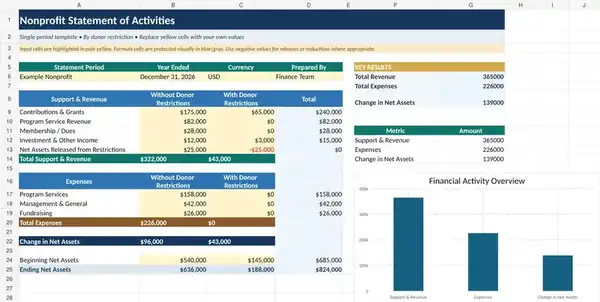
This Excel template is intended for a single reporting period. Revenue and support can be entered by restriction category, while formulas calculate totals and the change in net assets. The visual summary area helps management see the reporting period’s key results at a glance.
2. Comparative Statement of Activities Template
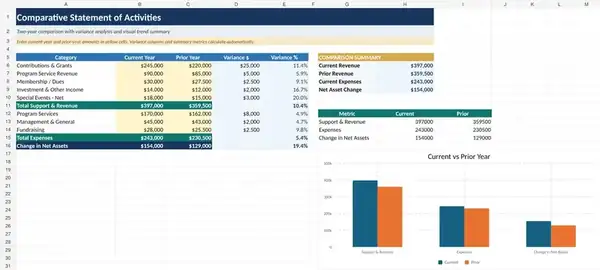
The comparative version is built for trend analysis. It presents the current year and prior year side by side, calculates the change between periods, and provides variance percentages where appropriate. This makes it useful for board packets, management reviews, budget discussions, and year-over-year performance analysis.
What Is a Statement of Activities?
A statement of activities reports the financial activity of a nonprofit over a defined period. It normally summarizes revenue and support, expenses, gains or losses where applicable, and the resulting increase or decrease in net assets. The statement helps readers answer a basic question: How did the organization’s activities affect its financial resources during this period?
The report may be prepared monthly, quarterly, annually, or for another management period. An audited nonprofit may have presentation and disclosure requirements that go beyond a general-purpose template, so the final external financial statements should follow the applicable accounting framework and professional guidance.
Typical Sections of a Nonprofit Statement of Activities
Although the exact line items depend on the organization, a statement commonly includes the following categories:
- Contributions and grants: donations, foundation grants, government grants, and other contributed support.
- Program service revenue: fees, tuition, admissions, service charges, or other revenue directly related to the mission.
- Membership dues: where relevant to the organization’s structure.
- Investment or other income: interest, dividends, realized gains, or other items as appropriate.
- Net assets released from restrictions: amounts whose donor-imposed restrictions were satisfied during the period, when applicable.
- Program expenses: costs associated with delivering mission-related services.
- Management and general expenses: administrative and governance costs.
- Fundraising expenses: costs incurred to solicit contributions and support fundraising activities.
- Change in net assets: the period’s net increase or decrease after revenue and expenses.
Without Donor Restrictions vs. With Donor Restrictions
One of the most important distinctions in nonprofit reporting is whether resources are subject to donor-imposed restrictions. Amounts without donor restrictions are generally available for the organization’s purposes, subject to normal legal, contractual, and board considerations. Amounts with donor restrictions are subject to a donor’s time or purpose restrictions until the specified conditions are satisfied.
The first template provides separate columns so these amounts are not mixed. This is useful because a nonprofit can appear financially strong in total while having a smaller amount of unrestricted resources available for current operations. Management should therefore understand both the total position and the restrictions attached to resources.
Statement of Activities vs. Income Statement
A statement of activities and a traditional income statement both summarize financial performance over a period, but the terminology and presentation differ. Businesses usually focus on revenue, expenses, and net income. Nonprofits typically report revenue and support, expenses, and changes in net assets.
The nonprofit report may also distinguish revenue based on donor restrictions and present expenses by functional classification. Because of these differences, simply renaming a commercial income statement is not always sufficient for nonprofit reporting.
How to Use the Single-Period Excel Template
- Set the reporting period. Replace the sample period with the actual month, quarter, or year.
- Customize the revenue rows. Add, rename, or remove categories so they reflect the organization’s actual sources of support.
- Separate restricted and unrestricted amounts. Enter each amount in the appropriate column based on the underlying donor agreement or accounting treatment.
- Enter expenses. Use the categories that reconcile to the accounting records.
- Review formula totals. Confirm that the calculated totals agree with the general ledger or trial balance.
- Update beginning net assets. The beginning balances should agree with the prior period’s ending balances.
- Review the ending balance. Confirm that the change in net assets rolls forward correctly.
How to Use the Comparative Template
The comparative worksheet is useful when the objective is not only to report the current result but also to explain movement from one period to another. Enter current-year and prior-year figures in the appropriate columns. The formulas then calculate the dollar variance and, where meaningful, the percentage variance.
Large changes should be investigated rather than merely highlighted. A significant increase in contribution revenue may reflect a successful campaign, a one-time grant, or timing. A decline in program expense may result from reduced service activity, a delayed project, improved efficiency, or an accounting classification change. The spreadsheet identifies the movement; management still needs to explain its cause.
Understanding the Change in Net Assets
The change in net assets is not the same thing as cash flow. A nonprofit can report a positive change in net assets and still experience cash pressure because revenue recognition and cash receipts may occur at different times. Conversely, an organization may receive cash that is restricted or related to a different reporting period.
For that reason, the statement of activities should be reviewed alongside a cash flow statement and other financial information. No single report provides a complete picture.
Expense Presentation and the Link to Functional Expenses
Expenses can be described by their natural classification, such as salaries, rent, supplies, professional fees, and depreciation, and by their functional classification, such as program services, management and general, and fundraising. A nonprofit may need information from both perspectives.
Our separate Statement of Functional Expenses Templates are designed specifically for that allocation process. Totals from the functional expense analysis should reconcile to the expense amount reported in the statement of activities.
Reconciliation and Internal Controls
Before using the statement for management, board reporting, grant reporting, or external distribution, reconcile it to the accounting records. Useful checks include comparing revenue to the general ledger, agreeing beginning net assets to the prior report, reviewing restricted balances against donor records, and verifying that total expenses match the functional expense schedule.
Organizations should also maintain documentation for journal entries, restriction releases, significant estimates, and classification decisions. Spreadsheet formulas reduce arithmetic errors, but they do not replace accounting review.
Common Mistakes to Avoid
- Combining restricted and unrestricted revenue without reviewing donor terms.
- Using beginning net assets that do not agree with the prior period.
- Entering cash receipts as revenue without considering the applicable accounting treatment.
- Failing to reconcile total expenses to detailed accounting records.
- Treating a positive change in net assets as equivalent to positive cash flow.
- Changing formulas without testing the resulting totals.
- Leaving sample figures or placeholder organization names in the final workbook.
- Using a general-purpose template as a substitute for required audited or statutory financial statement presentation.
How This Template Fits With Other Financial Statements
A statement of activities is most useful when viewed as part of a complete reporting package. The financial statement templates on this site can help organize related reports, while the cash flow and functional expense schedules provide different views of the same organization’s activity.
For internal reporting, management may also add budget columns, program-level schedules, grant-specific reports, or KPI dashboards. Keep the core statement clear enough that readers can understand the main financial story without being overwhelmed by operational detail.
Frequently Asked Questions
Is a statement of activities the same as a profit and loss statement?
They serve a similar purpose in showing financial activity over a period, but nonprofit terminology and presentation differ. A statement of activities normally focuses on changes in net assets and may distinguish resources with and without donor restrictions.
Can a small nonprofit use this Excel template?
Yes. The workbook can be simplified by removing line items that do not apply. The final report should still reconcile to the organization’s accounting records and follow any reporting requirements that apply.
Should restricted donations be shown separately?
Where the applicable accounting framework requires classification by donor restrictions, they should be tracked and presented appropriately. Review the donor agreement and current accounting guidance rather than relying on a generic label alone.
Why does the comparative template include variance columns?
Variance columns help identify significant year-over-year changes that deserve management attention. They are analytical tools and do not replace the underlying financial statement review.
Can I add a budget column?
Yes. For internal management reporting, a budget and budget-variance column can be useful. Keep statutory or audited presentation requirements separate from internal management enhancements.
Are these templates a substitute for accounting advice?
No. They are general-purpose Excel templates. Nonprofits should follow the accounting standards, donor agreements, grant requirements, tax rules, audit requirements, and other obligations applicable to their organization.